 simonwillison.netarticle
A new feature for my, blog built using my voice
Simon Willison describes building a new "Newsletters" index feature for his Django-powered blog almost entirely by talking to the ChatGPT desktop app's Codex voice mode (running GPT-6 Astra) while cooking dinner, then switching to typed prompts to review and fix the resulting GitHub pull request. He details the workflow — starting a local dev server, voice-describing requirements including a new model, migrations, four import scripts, and search integration — and reflects on where voice-driven coding agent interaction excels (multitasking, visual preview of changes) versus where typing remains more efficient (pasting errors, highlighting specific code).
What it claims
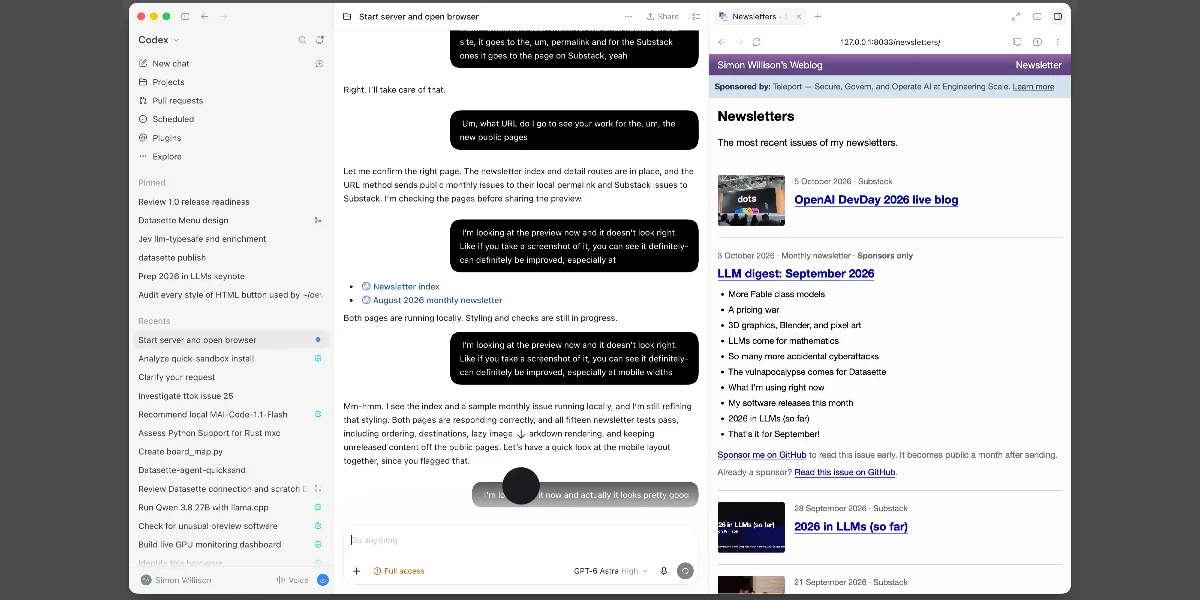
Simon Willison built a complete Django feature with the ChatGPT desktop app's Codex tab in voice conversation mode, running GPT-6 Astra High against his local checkout. It took about half an hour of talking while cooking. The voice session produced code that was nearly shippable. It then needed a second half hour of typed prompting after he reviewed the pull request. His verdict is that voice is good for multitasking but is not his daily driver.
How it works
- Seed with a typed prompt. He typed
Start dev server and open in browserfirst. That gave him a live preview he could later ask the agent to navigate, so he could check progress from across the kitchen. - Pick the right button. Use "Start new voice chat", the button to the right of the microphone, not the microphone itself.
- Talk through the requirements, disfluencies and all. The page quotes a rambling transcript with self-corrections that the model still interpreted correctly. It encoded fairly precise rules: - newsletters appear on day and month archive pages but not on tag pages or the homepage; - Substack copies are excluded from search because they duplicate blog content; - monthly sponsor newsletters become searchable once they go public, a month after sending.
- Let the agent design the UI. He gave design feedback by voice after glancing at the preview.
- Switch to the keyboard. He had Codex create a branch and open a PR, reviewed it in GitHub, and corrected it by typing.
One of the four importers uses Substack's undocumented API. The page says the model "either knew about or found via search" that API.
Limits
- Wrong import mechanism. The agent used Git in a subprocess for one import script. That import pulls from a private repository, so he had it rewritten to use the GitHub API. Review was what caught this.
- Production data path. Astra offered to export local data for loading into production. He rejected that because he wanted the feature to follow his existing import-script pattern. Doing it his way meant creating a new API key, which he could only do at the keyboard.
- Typing still wins for details. Pasting error messages and examples, or highlighting specific code, is more efficient than describing it aloud.
- Easy task. He chose a feature he was "certain" the model could handle: a model, a migration, views, templates and import functions. There is no evidence on harder tasks.
- Shared spaces. He says he would not use voice mode in a shared workspace.
Organisations named here
- OpenAI
- GitHub
- Substack
- Simon Willison
Technologies named here
- GPT-6 Astra High
- ChatGPT desktop app
- Django
- GitHub
- Codex
- ChatGPT
- Git
- GPT-6 Astra
Techniques named here
- Voice-driven coding with a local visual preview
- Mixed voice-then-keyboard review workflow
Related in coding-agents


