 simonwillison.netwriteup
Kākāpō Party
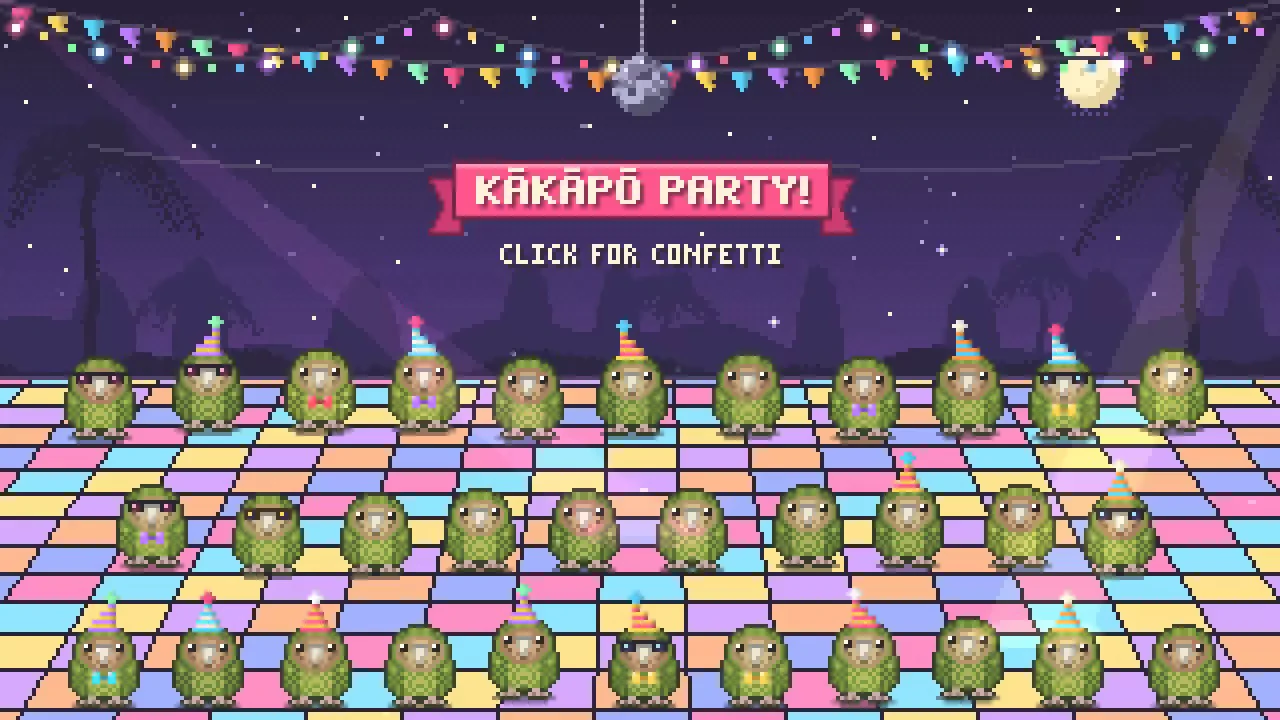
Simon Willison describes prompting Claude Opus 5.5 with reference photos to generate an animated pixel-art HTML5 canvas scene (kākāpō parrots partying with confetti), then using a local Claude Code session to drive Playwright, click through the page at scripted timestamps, and record a 15-second video of the result for a keynote slide. The post includes the full Playwright script Claude Code produced, showing how a coding agent can be tasked with browser automation and video capture as an end-to-end deliverable, not just code generation.
What it claims
A two-step workflow: Claude Opus 5.5 generated a self-contained HTML5 canvas pixel-art animation from three reference photos and a one-paragraph prompt. A local Claude Code session then turned that page into a 15-second video for a Keynote slide by writing and running a short Playwright script. The author reports the video "was exactly what I needed" with no manual editing mentioned.
How it works
- Generation prompt (Opus 5.5, with three photos from Google image search attached): > I need you to make an animation in animated pixel art on HTML 5 canvas of obviously pixel art kakapo jumping up and down having a party with confetti and suchlike - there should be at least 20 of them
- Download the HTML locally.
- Recording prompt (Claude Code): > Make me a video of file:///Users/simon/Downloads/kakapo-party.html - you need to load it in a browser and click on it a few times to get the confetti effect, the video should be 15s long / don't start clicking until 3s in / make sure several clicks are spread around the clickable area
The requirements are stated as observable outcomes: duration, click delay and click spread. They do not name tools. Claude Code chose Playwright on its own.
How to use it
The script Claude Code produced is reusable for any canvas or interactive page. It uses inline uv-style script metadata, Playwright's built-in context video recording, and a wall-clock-scheduled click list:
# /// script
# dependencies = ["playwright"]
# ///
import time
from playwright.sync_api import sync_playwright
W, H = 1280, 720
clicks = [
    (3.0, 640, 360), (4.2, 160, 120), (5.4, 1120, 120), (6.6, 180, 600),
    (7.8, 1100, 600), (9.0, 640, 100), (10.0, 380, 380), (11.0, 900, 380),
    (12.2, 640, 620), (13.2, 640, 300),
]
with sync_playwright() as p:
    b = p.chromium.launch()
    ctx = b.new_context(viewport={"width":W,"height":H}, record_video_dir="vids", record_video_size={"width":W,"height":H})
    page = ctx.new_page()
    t0 = time.time()
    page.goto("file:///Users/simon/Downloads/kakapo-party.html")
    for t,x,y in clicks:
        time.sleep(max(0, t-(time.time()-t0)))
        page.mouse.click(x,y)
    time.sleep(max(0, 16.0-(time.time()-t0)))
    ctx.close(); b.close()
Key mechanics in the script:
- The video is only written when
ctx.close()runs, intovids/. - The viewport size and the recording size are both set to 1280×720.
- Click times are measured from just before
goto, and late clicks are not compensated beyondmax(0, …). - The script records about 16s against the 15s request. The post does not say whether the result was trimmed.
Limits
- This is a single anecdote with no comparison against other models or tools. The "buzz" about Opus 5.5's pixel-art ability is cited, not measured.
- The script has a hardcoded absolute
file://path. - Timing relies on
time.sleep, so the clicks are approximate, not frame-accurate. - The video starts recording when the page is created, so page load time is included in the footage.
Organisations named here
- WeAreDevelopers
- Anthropic
- Claude Code
Technologies named here
- Claude Code
- Claude Opus 5.5
- Playwright
- HTML5 canvas
- Python
Related in multimodal
 latent.spacearticle
[AINews] Pi 1.0, Pi Durable, and AIE NYC
 github.comrepo
Show HN: Made an open-source Lego AI generator

 simonwillison.nettool