 huntress.comwriteup
M365 Token Spray and Replay Campaign Compromises Business Email Accounts
Huntress analysis of a July to September 2026 token replay ("token spraying") campaign: 497 successful Microsoft 365 sign-ins across 79 organizations, replayed from six addresses in 193.26.115.0/24 (1337 Services GmbH). Tokens came from AiTM relays, device-code phishing and social engineering. It covers four phases, rogue Entra devices, MFA method swaps, hidden inbox rules, hunting queries and Conditional Access guidance.
What it is
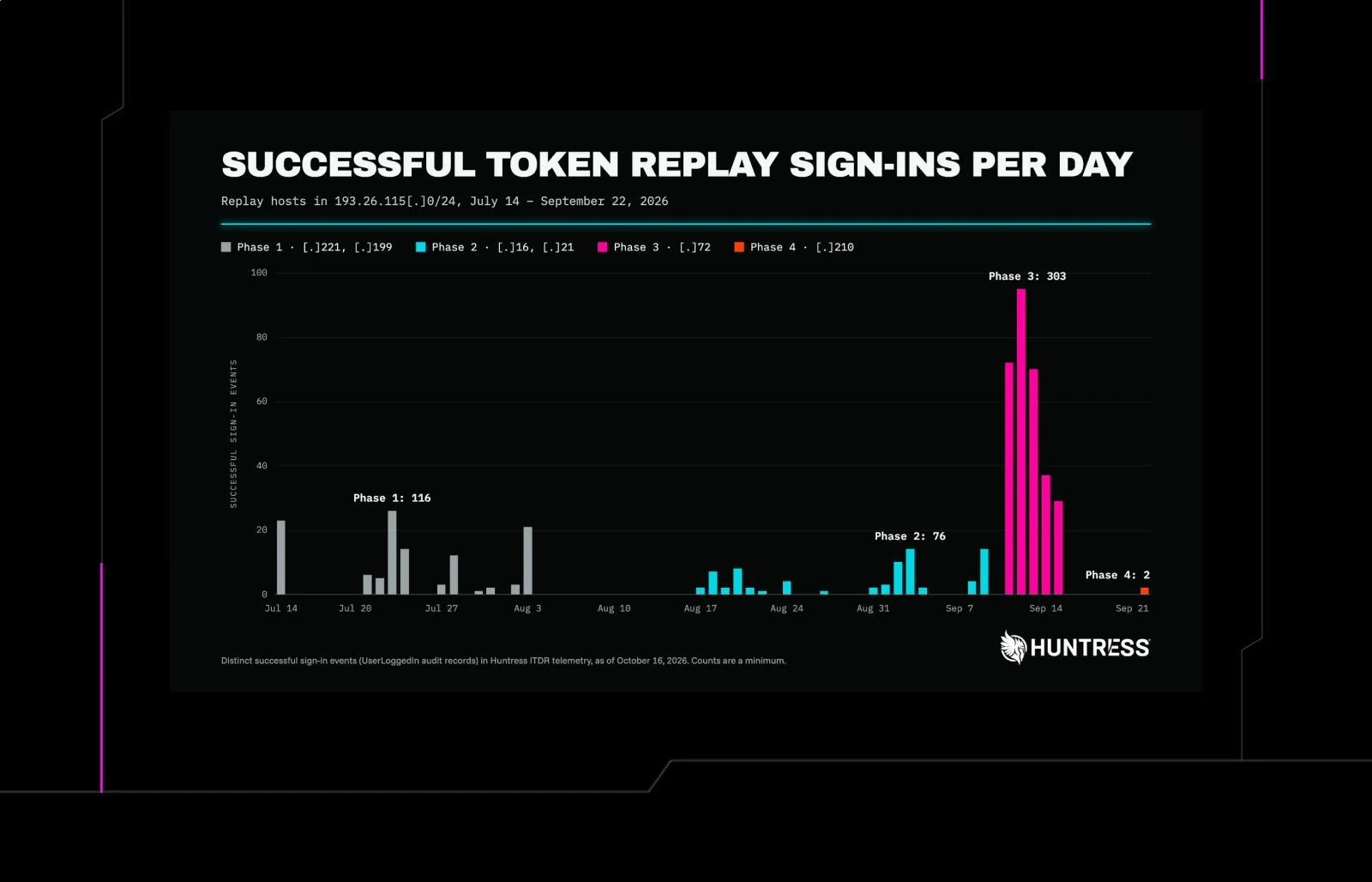
A Huntress write-up of a Microsoft 365 "token spraying" campaign that ran from 14 July to 22 September 2026. Attackers replayed session tokens stolen after MFA, so no password was needed. Huntress counts 497 successful sign-ins across 79 organizations. It also traced more than 200,000 failed attempts to 193.26.115[.]0/24 (AS210558, 1337 Services GmbH). The operator used six addresses in the /24, one after another.
How it works
Capture and replay run on separate infrastructure. The victim signs in through an AiTM relay, which passes the MFA prompt through and keeps the session. A 1337 Services address then replays that session. The gap was 12 minutes on 21 July and four minutes on 22 September. Device-code phishing and social engineering also supplied tokens.
The campaign had four phases:
timeline
    title Campaign phases
    14 Jul - 3 Aug : Phase 1 : .221 and .199 : rogue DESKTOP- devices
    17 Aug : Phase 2 : .16 and .21 : device-code phishing, MFA wipes
    11 Sep : Phase 3 : .72 : 303 sign-ins in 29 orgs
2 - 22 Sep : Phase 4 : .210 : Evoxt relay plus replay- Phase 1: Build A replayed tokens through the Office client with a
nodeuser agent. In 13 of 14 incidents on 14 July, the attacker registered a rogue device namedDESKTOP-plus eight hex characters. Huntress saw 48 such devices in total. Build B (.199) replayed browser sessions straight from AiTM relays. - Phase 2: The attacker wiped the victim's MFA methods through the security-info service, then registered a new authenticator minutes later. This happened in 19 organizations within three hours of first sign-in. It also used device-code flow and the Device Registration Service.
- Phase 3: Automated OAuth2:Token requests, mostly to Microsoft Graph, via the Office or Authentication Broker client.
- Phase 4: The relay ran at Evoxt Sdn. Bhd. and the replay came from .210.
Inbox rules were never created from 1337 addresses. They came from VPN or rented hosts such as ExpressVPN, NordVPN, CrownCloud, LeaseWeb and Interserver. Rule names were short, such as s, d and sss. Mail was moved to RSS Feeds, RSS Subscriptions or Conversation History. One rule keyed on payroll, direct deposit, bank and bonus terms, and the mailbox was used to email an external CPA. In four mailboxes, rules were created through the Outlook REST API.
What to do
- Revoke sessions as well as resetting the password. A reset alone leaves the access token valid for about 90 minutes and leaves attacker devices and MFA methods in place.
- Audit Entra devices named
DESKTOP-,Device-orWork Pcplus eight hex characters, especially those registered from hosting IPs. Confirm before deleting, as the pattern is not unique to this campaign. - Audit MFA methods for clear-then-re-register within minutes, and remove unrecognized authenticators.
- Review inbox rules: one to three-character or punctuation-only names, the folders above, and payroll or banking keywords.
- Restrict device-code flow with Conditional Access authentication-flow policies.
- Require MFA or block for All Users, All Cloud Apps and All Client App types, unconditionally.
- Hunt for
OAuth2:TokenandCmsi:Cmsisign-ins from hosting infrastructure using the Office or Authentication Broker client with anodeor bareMozilla/5.0user agent. Focus on those touching mailboxes or the Device Registration Service. - Hunt for new enterprise applications, and disable standard-user consent to new apps.
- Block the whole /24, not single addresses. Microsoft flagged .221, .72, .16 and .21 individually. The operator also used a few 1337 addresses outside the /24, such as 45.83.31[.]44 and 192.159.99[.]172.
Caveats
- A Conditional Access block (AADSTS53003) means the credential was valid, because the block fires after authentication succeeds.
- Do not triage by failed-attempt volume. In Phase 3, all 1,052 blocked sign-ins came from four organizations, while the 232 successes (the 303 total includes others) landed in 28 different ones, with no overlap.
- Replays of revoked sessions fail with SsoArtifactRevoked (AADSTS50133). The operator retried such sessions anyway.
- Huntress says it cannot state why the operator rotated addresses. The page text does not include the IOC table or the MITRE mapping.
Organisations named here
- 1337 Services GmbH
- AADSTS50133
- AADSTS53003
- Anton Ovrutsky
- AS210558
- bring your own IP
- Krebs on Security
- LSHIY
- token replay
- token spraying
Technologies named here
- Microsoft 365
- Microsoft Entra ID
- Microsoft Entra ID Protection
- Microsoft Graph
- Microsoft Security Intelligence
- SharePoint Online
- Conditional Access policies
- Microsoft Office client and Authentication Broker client
- Outlook REST API
- AiTM relays
- Exchange/Outlook mailboxes
- Microsoft Authenticator and other MFA methods
- VirusTotal and Censys
- Conditional Access
- Outlook
- Huntress
Techniques named here
- Token spraying
- Adversary-in-the-middle phishing relay
- Device code phishing
- Social engineering during a legitimate login
- Bring your own IP using hosting providers
- Rotation across six addresses in 193.26.115[.]0/24
- Registering at least 48 rogue Entra devices
- Adversary-in-the-middle
Threat actors named here
- 1337 Services GmbH
- LSHIY
Also named here
- device-code phishing
Related in Threat Intel
 huntress.comwriteup
Reverse Engineering the Six Stages of MacSync Stealer and RAT
 huntress.comwriteup
AI-Coded Malware | Analyzing Vibe-Coded AD Enumeration | Huntress

 blog.talosintelligence.comtool
Introducing CAIRN: Frontier tracking for AI-integrated malware (Cisco Talos)
 huntress.comwriteup