 attackthesoc.comwriteup
Enhancing Your Entity Timelines: Sentinel Activities in the Unified Microsoft Defender XDR Portal
A practical guide to the "Sentinel activities" feature in the unified Microsoft Sentinel/Defender XDR portal, which surfaces entity behavior (alerts, bookmarks, anomalies, custom activities) directly on identity/device/IP pages. The author walks through creating a custom activity that queries an OktaSSO custom log table via KQL to flag privileged Okta changes made by a user, then displays the enriched result in that user's entity timeline, and notes current limitations (no historical backfill, no pivot-to-hunting link).
What it is
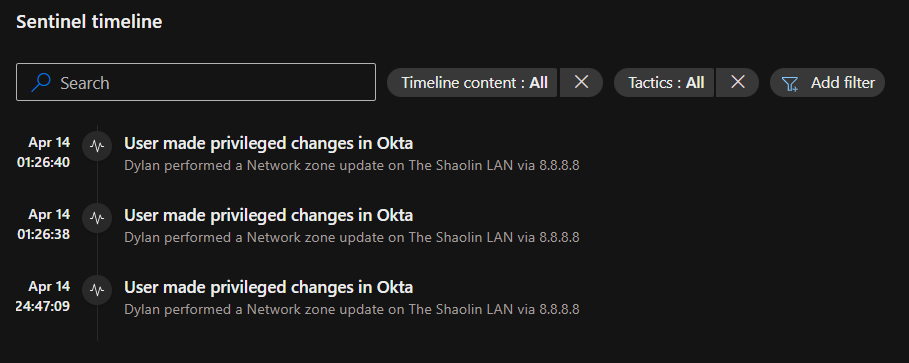
A walkthrough of Sentinel activities — a preview feature surfaced in the unified Microsoft Defender XDR portal (via the Sentinel/Defender integration) that lets you add custom, contextual entries to an entity's timeline. The worked example builds a "User made privileged changes in Okta" activity so analysts see non-Microsoft privilege-grant events directly on an identity page without tab-hopping.
How it works
Custom activities are defined per entity type (Account, Device, IP, etc.) through a wizard. Each is backed by a KQL query against a custom log table; the query's projected fields can be interpolated into a free-text title template that renders on the timeline. Crucially: every enabled activity re-runs each time an analyst opens that entity page — results only appear if a matching event has occurred since the activity was published.
Setup path: Sentinel events tab on any entity page → Customize Sentinel activities (upper right) → + → name/describe, set Entity type → write the query → review/validate → Create.
Preconditions / Affected
- Query constraints the page states explicitly: max 10 projected fields, and one field must be
TimeGenerated. - Entity mapping requires "strong identifiers" for one-to-one matching between query rows and the entity; weak or wrong identifiers are the author's first suspect when no results appear. Microsoft's strong-identifier combination table and Sentinel entity schema references are the sources to check.
- The custom log data (e.g. an
OktaSSOtable) must already be ingested into Sentinel.
What to do
Skeleton query and title template from the post (adapt fields/table to your data):
OktaSSO
| where alternadeId =~ {{UPNSuffix}}
| where outcome_result_s =~ "SUCCESS" and (eventType_s =~ "app.oauth2.client.privelege.grant" or eventType_s =~ "user.account.privilege.grant")
| extend target = parse_json(target_s)
| mv-apply target on ( project target.displayName )
| project TimeGenerated, ActorDisplayName = actor_displayName_s, TargetDisplayName = target_displayName, ActorIPAddr = client_ipAddress_s, displayMessage_s
Title template (query outputs interpolate the same way as identifiers):
{{ActorDisplayName}} performed a {{displayMessage_s}} on {{TargetDisplayName}} via {{ActorIPaddr}}Author's design guidance: keep these purely contextual — not alerts, not hunting. The goal is digestible orientation for an analyst, not detection logic.
Caveats
- Feature is still in preview.
- Timeline entries are inert: clicking an activity surfaces no drill-down or further action, and there is no "Go hunt" integration from them. Treat them as read-only context.
- The example query contains an author-acknowledged typo/simplification (
privelege,alternadeId) — validate field names against your own schema.
Technologies named here
- Microsoft Sentinel activities
- Microsoft Defender XDR portal
- KQL
- Microsoft Sentinel
- Advanced Hunting
- Okta
- WindowsDefenderATP API
- Microsoft Defender XDR
Techniques named here
- Custom Sentinel activity creation from custom logs
- Strong identifier mapping
- Detecting Okta privileged changes via KQL
Related in Blue Team & Detection

 huntress.comwriteup
AI-Coded Malware | Analyzing Vibe-Coded AD Enumeration | Huntress

 blog.talosintelligence.comtool
Introducing CAIRN: Frontier tracking for AI-integrated malware (Cisco Talos)
 huntress.comwriteup
Inside an Oracle Database SQL Injection Attack | Huntress
 huntress.comwriteup