 huntress.comarticle
Conditional Access Misconfigurations Exposed 55 Orgs with MFA On
Huntress details two 2026 campaigns that bypassed Microsoft 365 MFA despite Conditional Access policies being in place: device code phishing abusing Railway.com's clean IP infrastructure, attributed to the EvilTokens phishing-as-a-service platform, hitting 344 orgs, and a ROPC-based credential replay attack from LSHIY LLC infrastructure with 81 million login attempts and 78 compromised accounts, 55 of which had active MFA policies that didn't actually cover Azure CLI or legacy auth. It breaks down how narrow Conditional Access policy scoping, missing All Cloud Apps coverage, excluded user groups, report-only mode, mislabeled trusted locations, let attackers through, and recommends blocking device code flow and legacy auth via Conditional Access as the fix.
What it is
Two 2026 Microsoft 365 campaigns caught by Huntress's SOC that bypassed MFA even where Conditional Access (CA) was enabled. Both exploit auth flows most tenants never explicitly block. The actionable core the summary omits is why the CA policies failed and the specific setting that fixes ROPC.
How it works
Device code phishing (Railway/EvilTokens): Attackers generate their own Microsoft device code, embed it in a lure, and harvest the OAuth token when the victim authenticates at the real Microsoft endpoint. MFA is completed by the victim — the token (valid up to 90 days) is already stolen. It sidesteps MFA rather than beating it.
ROPC (LSHIY): The Resource Owner Password Credentials flow submits username+password directly to the /token endpoint, never touching the authorization endpoint. Because CA MFA policies hook the authorization endpoint, they don't fire — and they omit Azure resources like Azure CLI by default, so credential replay against Azure CLI mints a fresh token with no MFA prompt.
Preconditions / Affected
Any M365 tenant that (a) has not blocked the device code flow, or (b) has CA MFA scoped narrowly. The page enumerates the exact scoping gaps that let ROPC through — audit your own policies against these:
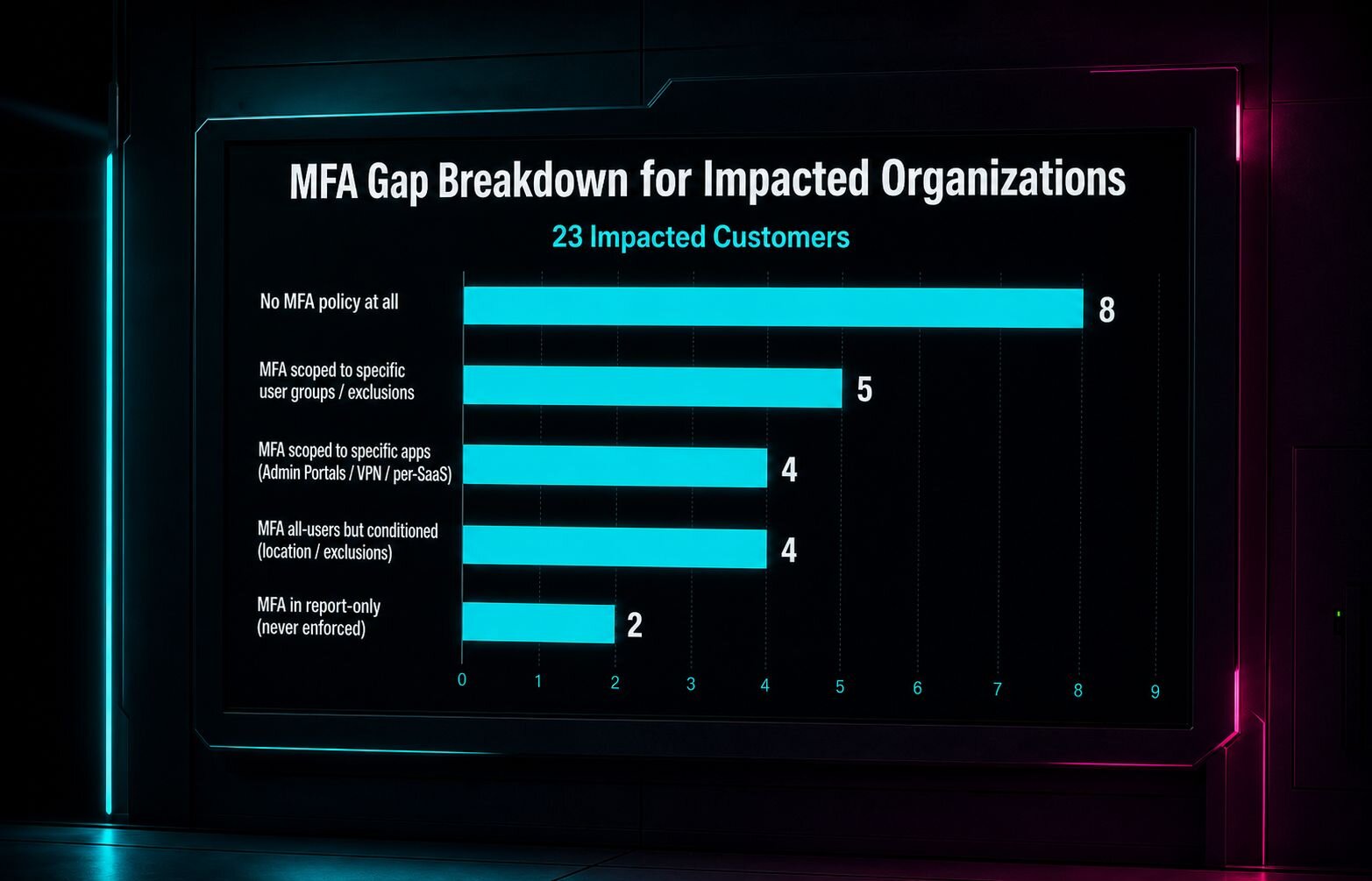
- MFA scoped to specific apps (e.g. Admin Portals) but not "All Cloud Apps" → Azure CLI slips through
- MFA scoped to specific user groups the compromised accounts weren't in
- MFA required only from untrusted locations, but attacker IP mislabeled as trusted/US-based
- MFA left in report-only mode (configured, never enforced)
One org had a policy explicitly named "Block Azure CLI" that did not block Azure CLI. Of 78 compromised accounts, 55 had active MFA CA policies; only 8 had none.
What to do
Two CA controls (both already defaults in Huntress Managed ISPM):
- Block the OAuth device code flow tenant-wide, or restrict it to accounts that genuinely need it. With it blocked, a victim entering the code at the real endpoint accomplishes nothing.
- Extend CA coverage to match what ROPC uses: all users, all cloud apps, all client app types including legacy auth. Enforce the strong-authentication setting
userStrongAuthClientAuthNRequired, which enforces auth at the client level and blocks ROPC flows.
Caveats
Blocking device code flow breaks legitimate input-constrained device logins (smart TVs, printers) — the reason to scope it to specific accounts rather than a blanket tenant block. The page notes the Railway traffic concentrated in three IPs (~84%), but these are clean PaaS IPs that Microsoft Identity Protection won't score as risky, so IP-reputation defenses don't help here.
Technologies named here
- Huntress Managed ISPM
- Microsoft 365
- Azure CLI
- Huntress Managed ITDR
- Azure AD Conditional Access
- Managed Deployments
- Microsoft Identity Protection
- Microsoft OAuth device code flow
- Microsoft SafeLinks
- Cisco
- Trend Micro
- OAuth
- Microsoft Entra ID
- Railway
- Flare.io
Techniques named here
- Device code phishing
- ROPC flow abuse
- Triple-wrapped phishing URLs
- Conditional Access scoping gaps exploitation
Threat actors named here
Related in Identity & Access
 huntress.comarticle
Education Under Attack: The Pattern Behind Recent University Breaches
 huntress.comarticle
Next-Gen Phishing Tactics Users Aren’t Ready For | Huntress
.png)
 aikido.devwriteup
Google API keys keep working after you delete them